- Version 1.37 (Bitlocker)
- Download 12
- File Size 53.25 KB
- File Count 1
- Create Date April 3, 2026
- Last Updated July 24, 2026
Freestyle2 PC Bitlocker Test Firmware (v1.37)
Experimental firmware for Freestyle2 USB for PC designed to enhance accesses to Bitlocker or other applications the require pre-OS boot access. Mac Version in development.
Customers with Freestyle2 keyboards purchased in 2024 or later who are experiencing problems with their keyboard during bootup can try this experimental firmware to see if it resolves the problem. Check your serial number to confirm if your keyboard supports DIY firmware updates.
800PBUSAAXXXX: Firmware Updates NOT Supported
800PBUSBAXXXX: Firmware Updates Supported (Factory Installed v1.32)
Installation Instructions
- Download the file to your PC and unzip
- Disconnect the keyboard and flip it over
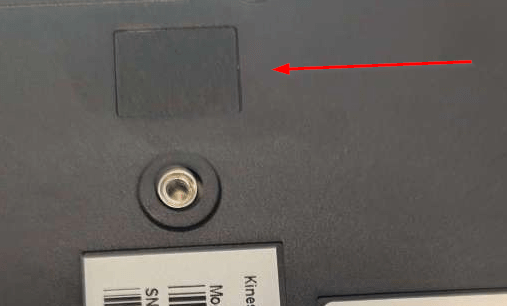
- Use a pair of strong tweezers or a thin object to remove the rectangular dark gray adhesive plastic BOOTLOADER BUTTON COVER on the backside of the right key module (see red arrow below). Note: You need to wedge underneath the cover and then pry it up.
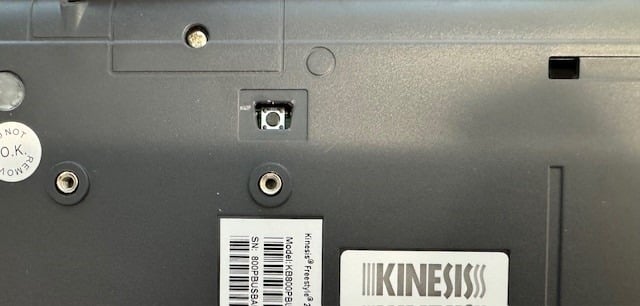
- Use a pencil or similar object to depress the exposed bootloader button (shown below) WHILE connecting the keyboard to your PC , release 1-2 seconds after connecting
- If done correctly, a removable drive will appear on your PC called “RPI-RP2”
- Copy/Paste the firmware file directly to that drive. The file will auto-install.
- Disconnect and reconnect your keyboard
Bootloader Button Cover In Place
Bootloader Button Cover Removed
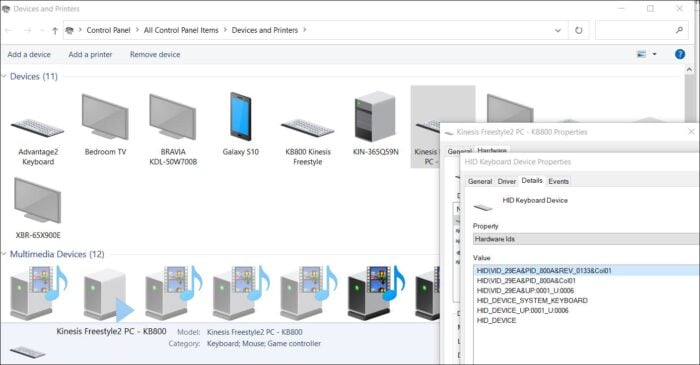
You can confirm the current Firmware Version in Device Manager