
Download Firmware
or download free
[free_download_btn]
Description
Customers with Freestyle2 keyboards purchased in 2024 or later who are experiencing key "ghosting" issues can perform a simple firmware update to resolve the problem. Check your serial number to confirm if your keyboard supports DIY firmware updates.
800PBUSAAXXXX: Firmware Updates NOT Supported
800PBUSBAXXXX: Firmware Updates Supported (Factory Installed v1.32)
Installation Instructions
- Download the file to your PC and unzip
- Disconnect the keyboard and flip it over
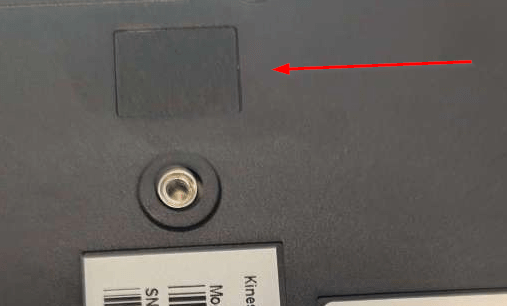
- Use a pair of strong tweezers or a thin object to remove the rectangular dark gray adhesive plastic BOOTLOADER BUTTON COVER on the backside of the right key module (see red arrow below). Note: You need to wedge underneath the cover and then pry it up.
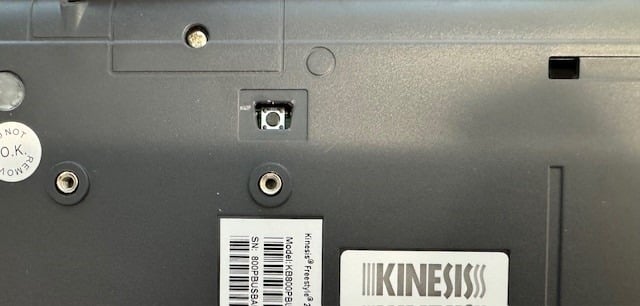
- Use a pencil or similar object to depress the exposed bootloader button (shown below) WHILE connecting the keyboard to your PC , release 1-2 seconds after connecting
- If done correctly, a removable drive will appear on your PC called “RPI-RP2”
- Copy/Paste the firmware file directly to that drive. The file will auto-install.
- Disconnect and reconnect your keyboard
Bootloader Button Cover In Place
Bootloader Button Cover Removed
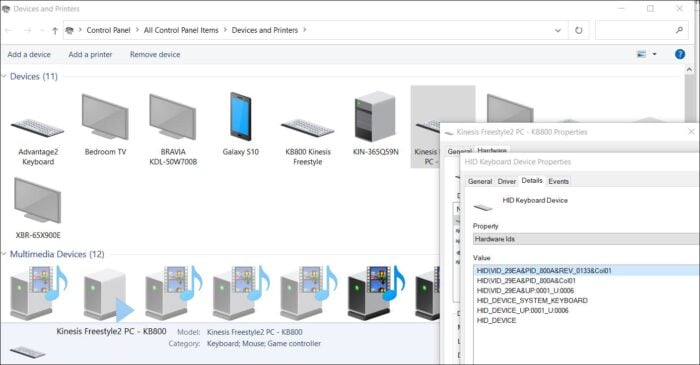
You can confirm the current Firmware Version in Device Manager
[changelog]
Categories & Tags
Similar Downloads
No related download found!

